Mobile publishing guide · updated October 5, 2026
Make a Hotel Lobby AI clip for Reels
Create a vertical photo performance, download its MP4, then finish the soundtrack and framing in your preferred editor or Reels publishing flow. The generator does not post to Instagram and does not include the original Hotel Lobby recording.
1. Start with readable subjects
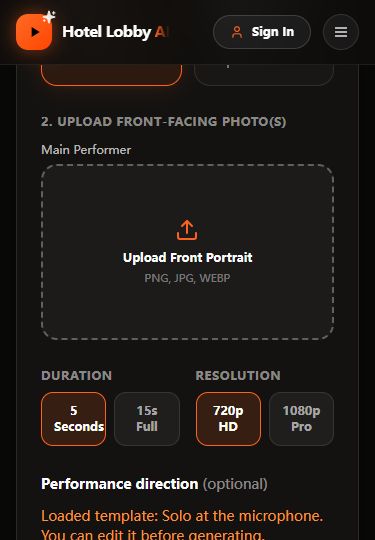
For Solo, upload one portrait or pet photo. For Duet, use two clear photos with similar framing. JPEG, PNG and WebP files up to 8MB are supported. Avoid faces covered by hands, strongly different camera angles or tiny subjects. Choose a simple performance preset.
2. Generate a short take first
The 5-second 720p setting costs 50 credits, matching the one-time new-account balance. A 15-second 720p take costs 120; 5-second 1080p costs 80; 15-second 1080p costs 200. Keep the camera fixed and gestures small while checking the result. There is no guarantee of exact original choreography or a unified booth from every pair of photos.
3. Inspect the whole MP4
- Watch the face, hands or paws from beginning to end, not just the poster frame.
- Check whether both Duet subjects remain visible and recognizable.
- Listen before adding music: model-generated sound may already be present.
- Check vertical framing on your phone. Our published 720p cases are 720 × 1280, a 9:16 frame.
See the solo case and cat case, including reference images and observed limitations.
4. Edit audio and share
Download the completed video from your account. Import it into your editor, review or mute the generated audio, and add audio you are permitted to use. Availability of a platform’s music library can depend on your account and region. Align a gesture or cut with the beat if useful; this does not create word-for-word lip sync.
Keep faces and important text away from screen edges where publishing controls or captions may overlap. Preview the final export with sound on your phone. Label the performance as AI-generated where appropriate and check the platform’s current publishing requirements.
If rendering fails or takes longer
Check the task status in your account instead of repeatedly submitting. Confirmed provider failures trigger the application’s credit refund handling; a pending or unknown result needs reconciliation. A completed clip with an unwanted creative effect is a different outcome.